1️⃣ 什么是防抖和节流?
🇨🇳 中文(面试标准答案)
- 防抖(Debounce):在事件被触发后,等待一段时间,如果期间再次触发,就重新计时,只执行最后一次
- 节流(Throttle):在一定时间内,无论触发多少次,都只执行一次
🇺🇸 English (interview version)
- Debounce: The function is executed only after the event stops firing for a certain delay.
- Throttle: The function is executed at most once in a fixed time interval, no matter how many times it is triggered.
2️⃣ 经典面试追问:二者的区别是什么?
🇨🇳 中文口语版
- 防抖:等你停下来才执行
- 节流:按时间间隔执行
👉 举例:
- 输入框搜索 → 防抖(停止输入再请求)
- 滚动加载 → 节流(每 200ms 执行一次)
🇺🇸 English
- Debounce waits until the user stops triggering the event.
- Throttle runs the function periodically during continuous events.
fn.apply()是什么意思?
理解这一点至关重要,因为无论是防抖还是节流,都会用到它。
我原来的理解是:fn.apply(this, args) ,只是fn绑定了指定的this和args,并没有执行。
这个理解是错的,所以防抖和节流的代码老是无法理解清楚。
你的理解其实只对了一半!你注意到了它在绑定 this 和传递参数,但实际上,apply 不仅会绑定,还会立刻执行函数。
在 JavaScript 中,真正「只绑定、不执行」的方法是 bind,而 apply 和 call 是会立即调用的。
1. apply 的真正行为:绑定 + 立即执行
我们可以把 fn.apply(this, args) 拆解为两个动作同时发生:
- 换身体(改变
this指向):把函数内部的this指向你传进去的第一个参数。 - 按按钮(立即执行):把
args数组拆开作为参数传进去,然后瞬间执行这个函数。
xxxxxxxxxxfunction greet(greeting, punctuation) { console.log(greeting + ', ' + this.name + punctuation);}const person = { name: '张三' };// 执行这一行时,greet 会【立刻】被调用并打印结果greet.apply(person, ['你好', '!']); // 输出: "你好,张三!"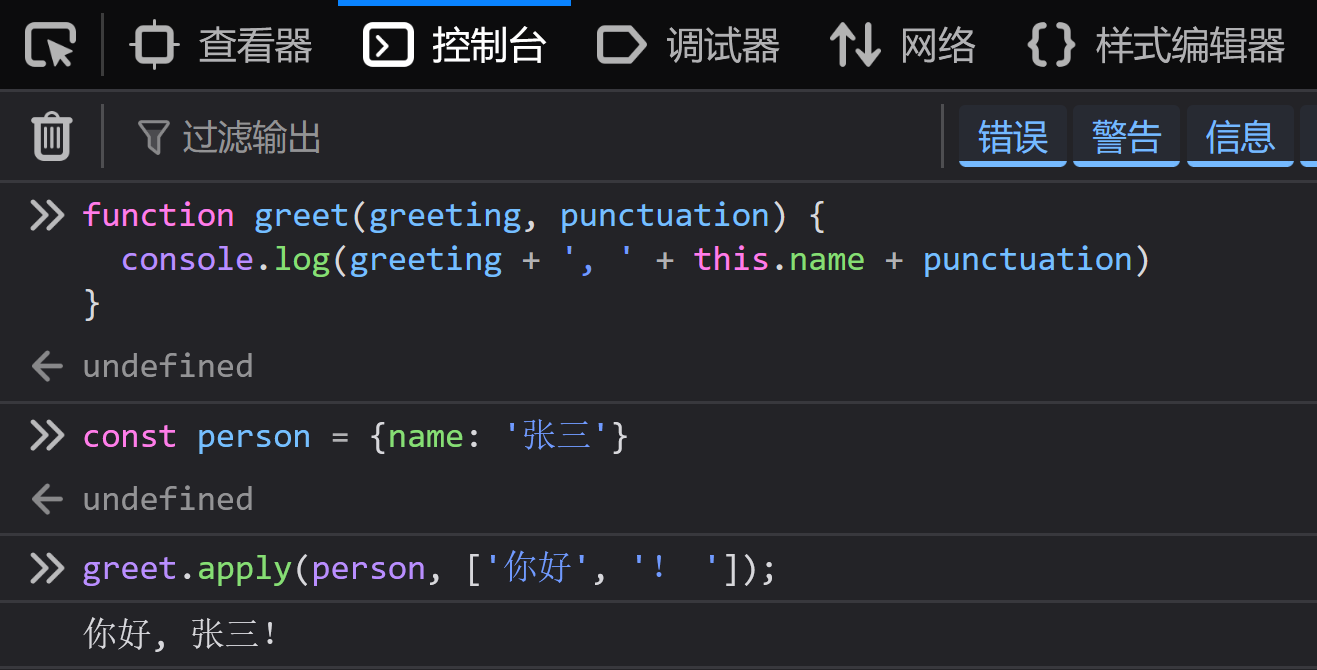
2. 为什么在防抖/节流里要用 apply?
如果你直接写 fn(...args) 也能执行,但为什么要大费周章地写 fn.apply(this, args) 呢?
这是为了完美冒充。
防抖和节流函数是作为「代理人」包裹在原本的事件函数外面的。为了让原本的函数(fn)感觉自己就像是在原生事件里被直接触发的一样,必须保证它的 this 上下文和参数不丢失。
举个经典的例子:原生的事件绑定
假设我们在网页上监听一个按钮的点击:
xxxxxxxxxxconst btn = document.querySelector('button');btn.addEventListener('click', debounce(function(e) { console.log(this); // 如果不用 apply,这里的 this 会变成 window! console.log(e); // 如果不用 args,这里的点击事件对象 e 就丢失了!}, 1000));在原生的点击事件中:
this本应该指向这个<button>标签。- 浏览器会自动传入一个
MouseEvent(事件对象e)作为参数。
如果不用 apply 的惨剧:
如果我们直接在防抖内部调用 fn():
xxxxxxxxxx// 错误/不完美的写法timer = setTimeout(() => { fn(); // 💥 此时内部的 this 丢失了,变成了默认的 window,参数 e 也没了}, delay);用了 apply 后的完美还原:
xxxxxxxxxx// 正确的写法return function(args) { // 这里的 ...args 接收到了浏览器传进来的 [MouseEvent] if (timer) clearTimeout(timer); timer = setTimeout(() => { // 这里的 this,就是闭包外层保存的 `<button>` 元素 // 这里的 args,就是外层接收到的点击事件数组 fn.apply(this, args); // 完美复活!执行 fn,并且 this 是 button,参数是 e }, delay);};核心总结
fn.apply(this, args)是会立即执行函数的。- 在防抖/节流中使用它,是为了把原函数的
this(比如 DOM 元素)和arguments(比如浏览器传入的Event对象)原封不动地传给真正要执行的函数,防止上下文丢失。
防抖和节流,我卡住的地方
防抖和节流,整体函数是什么意思,看到定义就知道了。但是我卡住的地方就在于,我不理解里面的fn到底是怎么执行的。闭包 + 高级函数 + setTimeout,我的大脑就是转不动。
卡点1:timer到底是存在了哪里?为什么第二次点击时可以判断 if(timer) 呢?这个不是函数里面定义的变量吗?
你的直觉非常敏锐!你问到了 JavaScript 中最核心、最经典,也最让人头疼的一个概念——闭包(Closure)。
你说的没错:“如果 timer 是函数内部定义的变量,函数执行完不就被销毁了吗?为什么第二次点击还能访问到上一次的 timer?”
我们用两张内存结构图来彻底看清 timer 到底藏在哪里。
1. 核心误区:你以为的执行过程(错误理解)
如果你把代码写成这样,确实会像你担忧的那样,每次点击 timer 都会被重置:
xxxxxxxxxx// ❌ 错误示范:如果每次点击都完整执行这个函数function clickHandler() { let timer = null; // 每次点击,都会重新声明一个 timer = null if (timer) clearTimeout(timer); // 此时 timer 永远是 null,if 永远不成立 timer = setTimeout();}xxxxxxxxxx<button onClick={clickHandler}>Search</button>
2. 揭秘真相:防抖真正的内存结构(闭包)
但在防抖的实现里,我们用了一个嵌套函数。
xxxxxxxxxx<button onClick={myClick}>Search</button>当你执行 const myClick = debounce(fn, 1000) 时,debounce 函数只执行了一次。
看下面这张图,它展示了当你初始化防抖和连续点击时,内存里到底发生了什么:
xxxxxxxxxx【第一步:初始化绑定 (只执行一次)】const myClick = debounce(fn, 1000);内存中生成了一个神秘的空间(闭包):┌────────────────────────────────────────┐│ debounce 的作用域 (这块内存不会被销毁) ││ let timer = null; <───┐ │└─────────────────────────┼──────────────┘ │ (依然保持引用)┌─────────────────────────┴──────────────┐│ 返回出来的匿名函数 (赋值给了 myClick) ││ function(...args) { ... } │└────────────────────────────────────────┘【第二步:用户第一次点击 (触发 myClick)】1. 进入匿名函数。2. 问:“闭包里的 timer 有值吗?” ──> 答:“是 null”。3. 跳过 if 块。4. 执行 timer = setTimeout(...)。5. 此时,闭包里的 timer 变成了 [定时器ID_1]。┌────────────────────────────────────────┐│ 闭包空间 ││ let timer = [定时器ID_1]; (被修改了) │└────────────────────────────────────────┘【第三步:用户第二次点击 (再次触发 myClick)】1. 再次进入匿名函数。2. 问:“闭包里的 timer 有值吗?” ──> 答:“有!是 [定时器ID_1]”。3. if(timer) 条件成立!4. 执行 clearTimeout([定时器ID_1]) ──> 成功干掉第一个定时器!5. 执行 timer = setTimeout(...),将闭包里的 timer 更新为 [定时器ID_2]。3. 用大白话总结 timer 存在哪里
- 它存在于一个“不灭的温室”(闭包)里。
- 只要你还在使用
myClick这个点击事件函数,它外层的这个“温室”就永远不会被浏览器垃圾回收机制销毁。 - 里面的
let timer变量,就像是一个全局变量一样被持久保存着,但神奇的是,外面任何人都无法访问和修改它,只有你的防抖函数内部可以访问。
所以,第二次及以后点击时,if(timer) 判断的不是一个新声明的变量,而是那个一直住在“温室”里、记录着上一次定时器状态的同一个 timer 变量。
卡点2:fn到底是怎么执行的?
其实就是 setTimeout + 用户不断触发时 这个过程我不是很理解。
我完全理解了!你的纠结卡在了一个核心盲点上:“我手在点,代码在跑,定时器在转,到底谁在什么时候把真正的 fn 推出去执行了?”
我们把外层的包裹函数比作“传达室保安”,把真实的 fn 比作“办业务的客人”。我们再来看一次最细致的执行轨迹。
一、 防抖(Debounce)的内层执行细节
假设 delay 是 2秒。
我们在第 0 秒点第一次,第 1 秒点第二次,然后停手。
xxxxxxxxxx时间轴 (秒) 0s ------------- 1s ------------- 2s ------------- 3s ---->用户动作: 👆点击(第1次) 👆点击(第2次) (静止不动...) (静止不动...)1. 第 0 秒:第一次点击
- 用户点击,触发了外层的“保安”函数。
if (timer) clearTimeout(timer);执行 —— 此时timer是null,啥也没清。timer = setTimeout(...)执行。注意!此时内层的fn.apply只是被打包塞进了定时器,它并没有执行,它在闭合的闹钟里“沉睡”。 闹钟定在 2 秒后(即第 2 秒)。
2. 第 1 秒:第二次点击(关键点)
- 用户又点了一次,“保安”函数再次响应。
if (timer) clearTimeout(timer);启动!这个动作瞬间把第 0 秒定下的那个闹钟砸碎了。 原来在里面沉睡的fn直接被销毁,根本没机会执行。timer = setTimeout(...)再次执行,重新打包一个fn.apply塞进一个新闹钟。这个新闹钟定在 2 秒后(即第 3 秒)。
3. 第 3 秒:静止满 2 秒
- 从第 1 秒到第 3 秒,用户没有再点击。
- 到了第 3 秒,新闹钟准时响起。
- 闹钟内部的包裹代码被激活,终于轮到
fn.apply(this, args)执行了! fn真正开始跑它自己的业务逻辑(比如发送搜索请求)。
二、 节流(Throttle)的内层执行细节
还是以时间戳版为例,假设 delay(CD时间)是 2秒。
用户在第 0 秒点击,在第 1 秒拼命狂点,第 2 秒又点。
xxxxxxxxxx时间轴 (秒) 0s ------------- 1s ------------- 2s ------------- 3s ---->用户动作: 👆点击(第1次) 👆👆👆狂点 👆点击lastTime: 0s 0s 0s 2snow: 0s 1s 2s ...1. 第 0 秒:第一次点击
- 此时
lastTime = 0。 - 用户点击,进入函数。获取当前时间
now = Date.now()。 - 判断条件:
now - lastTime(1784079026486- 0 = 1784079026486)delay(2000)。条件成立!(此时必然成立)。 - 立即执行
fn.apply(this, args)。fn在第 0 秒直接被调用。 - 执行完后,
lastTime = now,也就是说lastTime变成了 1784079026486。
2. 第 1 秒:用户狂点
- 无论用户点多少次,每次点击都会进来获取当前时间
now = 1784079026486。 - 判断条件:
now - lastTime(1784079027491 - 1784079026486 = 1005)delay(2000)。条件不成立! - 代码直接跳过
if块,直接结束。 内层的fn.apply连露脸的机会都没有,完全被无视了。
3. 第 2 秒:再次点击
- 用户在第 2 秒点击,进来获取当前时间
now = 1784079028497。 - 判断条件:
now - lastTime(1784079028497 - 1784079026486 = 2011)delay(2000)。条件刚好成立! - 再次执行
fn.apply(this, args)。fn第二次被成功调用。 - 更新
lastTime = 1784079028497,下一轮 2 秒 重新开始。
终极理清思路
- 防抖的
fn:是一个“死里逃生”的过程。它每被安排一次(setTimeout),都要经历一段等待期。如果在等待期内又有新安排,旧安排就被“谋杀”(clearTimeout)。只有在无人打扰的寂静期结束时,fn才能顺利存活并执行。 - 节流的
fn:是一个“查门票”的过程。每次触发,代码都会去算距离上次放行过去了多久。时间够了,就把fn放过去执行,并把大门关上(更新时间);时间不够,就把fn拦在if外面,直接丢弃。
这么拆开来看每一秒发生的事情,有没有感觉逻辑线连上了?
重点理解:
因为我没有看懂代码,我误以为用户多次触发会产生很多 fn 在“执行计划表”中,好像很多 fn 都会依次执行。
原因是我没有理解清楚
clearTimeout的作用,这个方法消除了timer,同时需要执行的 fn 也会被消除。只有真正的 fn 才会执行,其余的 fn 会随着 timer 的注销而注销。
卡点3:clearTimeout(timer),我没有真正理解其含义
看上去只是清理一个延时函数,但其实里面做了很多事情,其中最重要的就是将延时函数里面的 fn 注销掉了。
clearTimeout(timer) 会连根拔起,直接把还没来得及执行的 fn 彻底注销掉。
为了让你完全放心,我们来看看浏览器底层到底是怎么管理这个过程的:
1. setTimeout 到底干了什么?
当你执行 timer = setTimeout(fn, 2000) 时,JS 引擎其实做了两件事:
- 它在浏览器的后台“计划表”里注册了一个任务:“在 2000 毫秒后,把
fn推入执行队列。” - 它会返回一个整数 ID(比如
1、2、3),这个 ID 就是那张计划表里的行号(也就是你的timer变量拿到的值)。
2. clearTimeout(timer) 的注销动作
当你在第二次点击触发 clearTimeout(timer) 时,你其实是拿着这个行号对浏览器说:“把计划表里第 timer 行的任务给我擦掉!”
此时,浏览器会立刻去后台:
- 找到那行计划。
- 物理抹除这个定时任务。
- 结果就是:原本排队等待在 2000 毫秒后执行的那个
fn,直接从内存和计划表中消失了,它永远不会被推入执行队列,更不会被执行。
3. 用一个最生活化的比喻
你可以把 timer = setTimeout(fn, 2000) 理解为“点外卖”:
- 订餐成功后,外卖平台给你生成了一个订单号(这就是
timer)。 - 厨师(浏览器)收到订单,开始准备在 30 分钟后(
delay)把外卖(fn)送到你家。
当你连续点击,触发 clearTimeout(timer) 时,就像是你突然“取消了订单”:
- 你拿着订单号(
timer)点击了退单。 - 平台(浏览器)收到后,直接作废了整个订单。
- 结果:外卖(
fn)根本不会送过来,你什么都吃不到。然后防抖函数又紧接着帮你下了一个新订单,重新开始等 30 分钟。
所以,老的那次 fn 是被真正地、彻底地注销了,绝对不会在暗地里悄悄执行。
3️⃣ 手写防抖
JavaScript 实现
xxxxxxxxxxfunction debounce(fn, delay = 300) { let timer = null; return function (args) { clearTimeout(timer); timer = setTimeout(() => { fn.apply(this, args); }, delay); };}面试口语解释
🇨🇳:
核心就是用 setTimeout + clearTimeout,每次触发都清掉上一次的定时器,只保留最后一次。
🇺🇸:
We use setTimeout and cancel previous timers with clearTimeout to ensure only the last call is executed.
4️⃣ 手写节流
时间戳版本(常见)
xxxxxxxxxxfunction throttle(fn, delay = 300) { let lastTime = 0; return function (args) { const now = Date.now(); if (now - lastTime >= delay) { lastTime = now; fn.apply(this, args); } };}定时器版本(另一种)
xxxxxxxxxxfunction throttle(fn, delay = 300) { let timer = null; return function (args) { if (timer) return; timer = setTimeout(() => { fn.apply(this, args); timer = null; }, delay); };}面试解释
🇨🇳: 节流就是“规定时间内只允许执行一次”,要么用时间戳控制,要么用定时器锁住。
🇺🇸: Throttle ensures the function runs only once per time interval using either timestamps or a timer lock.
5️⃣ 进阶追问(面试官很爱问)
Q1:防抖能不能立即执行第一次?
👉 可以(leading debounce)
xxxxxxxxxxfunction debounce(fn, delay, immediate = false) { let timer = null; return function (args) { const callNow = immediate && !timer; clearTimeout(timer); // clearTimeout这里的参数,如果是 null 或者 undefined,都是安全的,不会报错。所以加上或者不加上 if(timer) 都可以 timer = setTimeout(() => { timer = null; }, delay); if (callNow) fn.apply(this, args); };}这里的 setTimeout 里面,是不是缺少这句代码
fn.apply(this, args)?
不缺。
因为如果需要防抖立即执行第一次,那么immediate就为true。
那么刚开始,timer为null,callNow就为true,fn会立即执行第一次。
下一次点击时,只有等到delay时间之后,timer被设置为null,此时callNow才能为true,才能让下一次调用可以再次立即执行。
所以整个思路要搞清楚。
立即执行第一次的debounce和之前例子的debounce执行是不同的:
举个按钮例子
代码:
xxxxxxxxxxconst submit = debounce(() => {console.log("submit");},1000,true);用户:
xxxxxxxxxxclickclickclickclick时间:
xxxxxxxxxx0ms 第一次clickfn执行 ✅200ms 第二次clicktimer存在不执行 ❌400ms 第三次click不执行 ❌800ms 第四次click不执行 ❌1000mstimer=null最终:
xxxxxxxxxxsubmit只打印一次。
两者对比
Leading debounce(立即执行)
xxxxxxxxxx第一次触发↓立即 fn()↓等待 delay↓解锁代码:
xxxxxxxxxxif(callNow){fn()}Trailing debounce(延迟执行)
这个就是我们之前实现的代码。
xxxxxxxxxx第一次触发↓启动timer↓不断重置timer↓停止触发↓delay后执行fn()代码:
xxxxxxxxxxsetTimeout(()=>{fn()},delay)
Q2:节流最后一次能不能执行?
可以(trailing throttle),但需要稍微升级实现(面试加分点)
Q3:应用场景区别(非常重要)
| 场景 | 技术 |
|---|---|
| 输入搜索 | 防抖 |
| resize | 节流 |
| scroll监听 | 节流 |
| 按钮点击防重复提交 | 防抖 |
| 游戏按键 | 节流 |
6️⃣ 一句话总结(面试杀手锏)
🇨🇳 中文
- 防抖:延迟执行,只执行最后一次
- 节流:固定频率执行
🇺🇸 English
- Debounce: executes after the event stops
- Throttle: executes at a fixed interval
7️⃣ 如果面试官继续深挖(加分点)
可以这样说:
防抖适合“最终状态”,节流适合“过程控制”
防抖节流 + React Hooks 实现版(useDebounce / useThrottle)
下面实现的
xxxxxxxxxxuseDebounce(value, delay)useThrottle(value, delay)主要用于“值(value)的防抖 / 节流”。
而我们最开始讲的 JavaScript:
xxxxxxxxxxdebounce(fn, delay)throttle(fn, delay)是用于函数(callback)的防抖 / 节流。
但其实函数的防抖和节流,在项目中还是很常见的,所以这种hooks也是很常见的:
useDebounceCallback、useThrottleCallback。比如说 window resize 时,需要加上防抖。
xxxxxxxxxxconst handleResize = useDebouncedCallback(()=>{console.log(window.innerWidth)},500)实现也很简单,像js那样实现即可。
① useDebounce(React 防抖 Hook)
使用场景
- input 搜索
- filter 输入
- 表单实时校验
核心思路
- 维护一个 state
- 用
setTimeout延迟更新 - 每次 value 变化都清理上一个 timer
实现代码
xxxxxxxxxximport { useEffect, useState } from "react";export function useDebounce(value, delay = 300) { const [debouncedValue, setDebouncedValue] = useState(value); useEffect(() => { const timer = setTimeout(() => { setDebouncedValue(value); }, delay); return () => { clearTimeout(timer); }; }, [value, delay]); return debouncedValue;}面试解释(口语版)
🇨🇳: 每次 value 变化时我不会立即更新,而是启动一个定时器。如果在 delay 时间内 value 又变化了,就清除上一次的定时器,只保留最后一次更新。
主要就是使用useEffect来监听value的变化,value变化时,会重新执行useEffect,React 总是先清理上一次 Effect,再执行下一次 Effect。所以清理函数会先执行,然后执行effect里面的代码。
🇺🇸: It delays updating the state until the value stops changing for a given delay.
使用方式
xxxxxxxxxxconst [input, setInput] = useState("");const debouncedInput = useDebounce(input, 500);useEffect(() => { // 只在“停下来之后”触发 fetch(`/api/search?q=${debouncedInput}`);}, [debouncedInput]);
② useThrottle(React 节流 Hook)
使用场景
- scroll
- resize
- mousemove
- 高频事件
核心思路
- 固定时间间隔内只允许更新一次
- 用
lastTime或timer控制
版本1:时间戳实现(推荐)
xxxxxxxxxximport { useEffect, useRef, useState } from "react";export function useThrottle(value, delay = 300) { const [throttledValue, setThrottledValue] = useState(value); const lastTime = useRef(0); useEffect(() => { const now = Date.now(); if (now - lastTime.current >= delay) { lastTime.current = now; setThrottledValue(value); } }, [value, delay]); return throttledValue;}版本2:定时器实现(更稳定)
xxxxxxxxxximport { useEffect, useRef, useState } from "react";export function useThrottle(value, delay = 300) { const [throttledValue, setThrottledValue] = useState(value); const timer = useRef(null); useEffect(() => { if (timer.current) return; timer.current = setTimeout(() => { setThrottledValue(value); timer.current = null; }, delay); }, [value, delay]); return throttledValue;}面试解释(口语版)
🇨🇳: 节流就是控制更新频率,在一定时间内只允许执行一次 state 更新。
🇺🇸: Throttle limits how often state can be updated during continuous changes.
在 React 18/19 中处理高频输入时,有时候官方更推荐使用内置的 useDeferredValue。 useDeferredValue 完美适用纯前端 CPU 密集型场景。它的核心舞台是:数据已经在前端(本地内存中),但因为数据量太大,渲染/过滤时会导致页面卡顿。
③ React 面试加分点(重点!!!)
面试官经常追问👇
Q1:为什么要用 useRef 存 timer?
👉 答:
🇨🇳: 因为 useRef 不会触发重新渲染,而且可以跨 render 保持同一个值。
🇺🇸: useRef keeps a stable mutable value across renders without causing re-renders.
Q2:useDebounce vs useThrottle 本质区别?
| 维度 | useDebounce | useThrottle |
|---|---|---|
| 触发方式 | 停止后执行 | 按间隔执行 |
| 场景 | 搜索 | 滚动 |
| 控制方式 | 清定时器 | 限制频率 |
Q3:能不能封装成“函数防抖 Hook”?
👉 可以升级(高级面试题):
xxxxxxxxxximport { useCallback, useRef, useEffect } from 'react';/** * 自定义防抖回调 Hook (安全生产版) * @param {Function} fn - 需要进行防抖处理的目标回调函数 * @param {number} delay - 防抖延迟时间(毫秒),默认 300ms * @returns {Function} - 返回一个引用稳定、具备防抖功能的全新函数 */export function useDebouncedCallback(fn, delay = 300) { // 1. 用于记录定时器的 ID(类似传统防抖里的 timer 变量) // 使用 useRef 的原因:在组件重新渲染时,timer.current 的值可以跨渲染保持,不会被重置 const timer = useRef(null); // 2. 用于保存最新 fn 的引用盒(这是解决【闭包陷阱】的关键) // 因为 fn 内部可能会读取组件的最新 State。如果不存入 ref, // setTimeout 内部闭包抓到的 fn 就永远是旧渲染周期的 fn,导致拿到的 State 永远是旧的。 const fnRef = useRef(fn); // 3. 【同步机制】每次组件渲染时,都把最新的 fn 塞进 fnRef.current 盒子里 // 这样,不论组件渲染多少次,fnRef.current 永远指向当前最热乎、包含最新状态的那个 fn useEffect(() => { fnRef.current = fn; }, [fn]); // 只要传入的 fn 变了,就更新盒子的内容 // 4. 【安全保障】组件卸载(Unmount)时的清理工作 // 如果用户在定时器还没触发时,就切换页面销毁了该组件, // 这个副作用(Effect)的返回函数会自动执行,把定时器杀掉,防止引发内存泄漏 useEffect(() => { return () => { if (timer.current) { clearTimeout(timer.current); } }; }, []); // 空依赖数组,确保只在组件销毁时执行一次 // 5. 【稳定输出】使用 useCallback 包裹最终返回的防抖执行函数 // 依赖项只有 [delay]。只要 delay 不变,React 就会保证返回的这个匿名函数“内存地址绝对不变”。 // 这能完美避免因为函数引用变化,导致子组件或者绑定的事件重复触发、或者导致子组件误重新渲染。 return useCallback((args) => { // a. 每次用户触发事件(比如每次按键输入),先无条件清除上一次还没执行的定时器 if (timer.current) { clearTimeout(timer.current); } // b. 重新开启一个新的定时器 timer.current = setTimeout(() => { // c. 重点:这里不直接调用 fn(...args),而是通过 fnRef.current() 去盒子里拿最新版的函数执行。 // 这样无论延迟有多久,执行时都能完美拿到组件最新的 State、Props 和上下文。 fnRef.current(args); }, delay); }, [delay]); }
x
import { useCallback, useRef, useEffect } from 'react';/** * 纯时间戳版 节流回调 Hook (头部立即执行,无定时器开销) * @param {Function} fn - 需要节流的目标函数 * @param {number} delay - 节流间隔时间(毫秒),默认 300ms */export function useThrottleCallback(fn, delay = 300) { // 1. 拦截闭包:永远把最新的函数塞进 ref 盒子里 const fnRef = useRef(fn); useEffect(() => { fnRef.current = fn; }, [fn]); // 2. 记录上一次成功执行的时间戳 // 使用 useRef 确保这个时间戳在组件多次渲染时不会被重置 const lastExecutedRef = useRef(0); // 3. 返回引用绝对稳定的节流函数 return useCallback((args) => { const now = Date.now(); // 4. 核心逻辑:当前时间减去上一次执行时间,是否大于等于设定的延迟 if (now - lastExecutedRef.current >= delay) { // 满足条件,立刻调用最新版本的函数 fnRef.current(args); // 紧接着,把当前执行的时间戳记录下来,作为下一次比对的基准 lastExecutedRef.current = now; } // 如果不满足条件,则静默忽略,什么都不做(这就实现了高频触发的拦截) }, [delay]);}
为什么react里面的实现没有使用apply或者加上this呢?
在 React 的自定义 Hook(以及 Lodash 等现代 JavaScript 库)的实现中,不特意写成
callbackRef.current.apply(this, args),主要有以下三个核心原因:1. 箭头函数(Arrow Functions)不需要
this在现代 React(特别是 Hooks 时代)中,我们在组件内部定义的函数绝大多数都是箭头函数:
xxxxxxxxxxconst handleSearch = (value) => {setQuery(value); // 这里的 setQuery 来自于词法作用域};箭头函数本身没有自己的
this,它的this永远指向它被定义时的外层上下文。因此,对于箭头函数来说,你用不用apply(this),它的this表现完全没有区别。2. React 的核心精神是“函数式编程”
在 React 的函数组件(Function Components)中,
this已经退出了历史舞台:
- 在以前的 Class 组件 中,我们需要频繁使用
this.setState或this.props,所以this的指向至关重要。- 在 函数组件 中,所有的状态(
useState)、属性(props)和方法(setCount)都是通过闭包(Lexical Scoping)直接访问的,完全不依赖组件实例的this。即使你在执行时强行绑定
apply(this),这里的this通常也是undefined(在严格模式下),对函数内部的逻辑没有任何帮助。3. 直接调用会自动保留原函数的上下文
如果你传入的不是箭头函数,而是一个普通函数(带有
this绑定的函数),JavaScript 的默认调用机制已经足够了。看下面这个例子:
xxxxxxxxxxconst obj = {name: 'React',// 使用 bind 已经绑定好上下文的函数logName: function() { console.log(this.name); }.bind(this)};// 当你把 obj.logName 作为参数传给 Hook 时:useDebouncedCallback(obj.logName, 300);在 JavaScript 中,如果一个函数在传入 Hook 之前就已经通过
.bind()绑定了this,或者它本身就是某个对象的普通方法且不需要动态改变this,那么直接执行fn(...args)就能完美运行。⚠️ 唯一的例外情况
只有一种极其罕见的情况需要加
this:你在原生 DOM 节点上,故意不使用 React 的事件系统,且极其依赖原生 DOM 触发事件时隐式绑定的this(指向 DOM 元素本身)。但在 React 的开发规范中,我们永远推荐使用
e.currentTarget来获取当前触发事件的 DOM 元素,而不是依赖this。📝 总结
直接写
callbackRef.current(...args)充分利用了 ES6 的剩余参数(Rest Parameters),代码最干净、体积最小,且完全契合 React 函数式编程、无this的现代设计哲学。
④ 面试终极总结
🇨🇳 中文
- useDebounce:延迟更新 state,适合输入场景
- useThrottle:限制更新频率,适合高频事件
- 核心都是:控制副作用触发频率
🇺🇸 English
- useDebounce delays state updates until input stops changing
- useThrottle limits how often updates can happen
- Both are used to optimize performance in React apps